
There is a new post. Click here to view the latest post.
Update
- Modified Position Change Feature Without Records
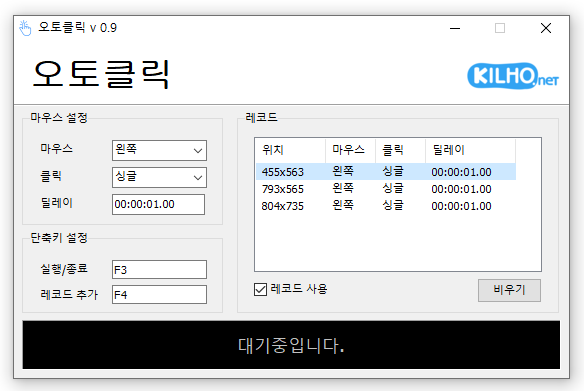
- A mouse automatic click program.
- You can add time and coordinates to use in multiple patterns.
- Click details can be specified.
Website
- AutoClick: https://autoclick.kilho.net
History
-
Version 1.3.10 (2025/06/01)
- Fixed bugs and improve reliability.
-
Version 1.3.7 (2025/01/24)
- Added the feature to adjust the mouse position after auto-click.
-
Version 1.3.6 (2024/12/13)
- Improved UI clarity with HiDPI optimization
- Fixed error when records are not used
- Added repeat count feature
-
Version 1.3.5 (2024/11/16)
- Added support for Italian, French, Russian, and Chinese languages
License
- AutoClick is freeware.
- You can use it freely in any setting, including at work, at home, in government offices, and at school.
- You may freely distribute it anywhere.
Download
 Download
(Windows)
Frequently Asked Questions (FAQ)
- Is the automatic mouse clicker free?
Yes, this program is free to use in any setting, including at work, at home, at school, and in government offices. - Do I need to install the program?
No, it is provided as a portable program that you can use right away without installation. - Can it click multiple locations in sequence?
Yes, you can set multiple coordinates and have the program click them in sequence. - Can it click at specific intervals?
Yes, you can specify the intervals between clicks in detail.
Related Links
- Update notice: https://blog.kilho.net/archives/notice/2940
좋은 프로그램 넘 감사합니다
실행할 때마다 무작위로 딜레이를 주는 기능이 있으면 좋을 거 같아요
좋은 의견 감사합니다. 다음 업데이트에 반영하도록 하겠습니다.