
There is a new post. Click here to view the latest post.
Update
- Improved video download stability on a supported website
- Fixed repeated unnecessary windows on some systems
- Added completed item removal and re-download support
- Added multilingual support for the delete option
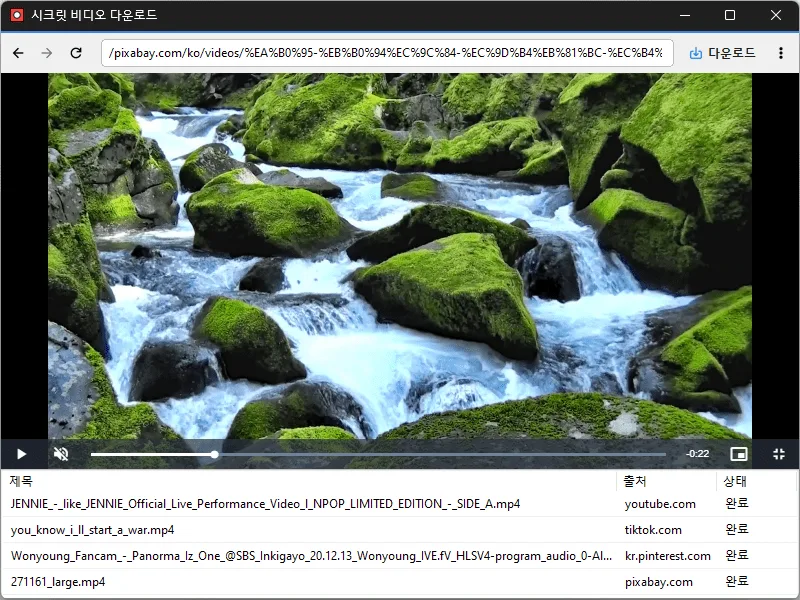
- Conveniently watch videos from OTT services and various other websites.
- Automatically switch full-screen video to a PIP window.
- Freely adjust the position and size of the PIP window.
- Keep watching in the PIP window while doing other work.
- Save an entire web page as an image with a hotkey.
- Easily save publicly available videos.
Website
- Secret Video : https://secretvideo.kilho.net
History
-
Version 1.1.8 (2026/08/12)
- Added full-page screenshot capture for easy image saving (Ctrl+P)
- Added Spanish (es) language support
-
Version 1.1.7 (2026/07/09)
- Updated WebView2 support for improved installation and launch stability
- Improved WebView2 installation guidance for easier troubleshooting
- Improved download and installation stability to reduce unexpected interruptions
- Improved package installation speed and update efficiency
-
Version 1.1.6 (2026/06/04)
- Improved issues where video downloads could fail or stop on some websites
- Improved download connection stability
- Fixed download connection failures occurring in certain environments
-
Version 1.1.5 (2026/05/04)
- Fixed "Server IP address could not be found" errors on certain sites
- Improved detection accuracy for in-page navigation (video switches, Shorts swipes, etc.)
- Improved instant recognition of pages already open at startup
- Fixed missing download links on certain sites
License
- Secret Video is freeware.
- You are free to use it anywhere, including at work, at home, in government offices, and at school.
- The program itself may be freely distributed. (This does not permit redistribution of videos saved using the program.)
Download
 Download
(Windows)
Frequently Asked Questions (FAQ)
- What is the PIP (Picture-in-Picture) feature?
It automatically switches full-screen videos on websites to a PIP window, letting you watch videos while working on other things. - Can I change the position or size of the PIP window?
Yes. You can freely adjust the PIP window’s position and size, keep it always on top, and your last settings are saved automatically. - Which sites’ videos are supported?
It supports videos from various sites. Use may be restricted by each site’s policies and copyright rules, so check the site’s terms of use before using it. - Can I download copyrighted videos?
Copyright remains in effect even for publicly available videos. Copying or redistributing videos beyond personal use may violate copyright law, so check each site’s terms of use and obtain permission from the copyright holder before using them.
Related Links
- Update Notice : https://blog.kilho.net/archives/notice/2940
정말 최고의 프로그램입니다. 너무 잘쓰고있습니다. 항상 감사합니다.