
Run this first after reinstalling Windows
After setting up a new PC or reinstalling Windows, you probably want to know:
“What hardware is in my PC?”
“Are all the drivers installed correctly?”
1stChip is a small program that shows you both at a glance on one screen.
PC specifications on one screen
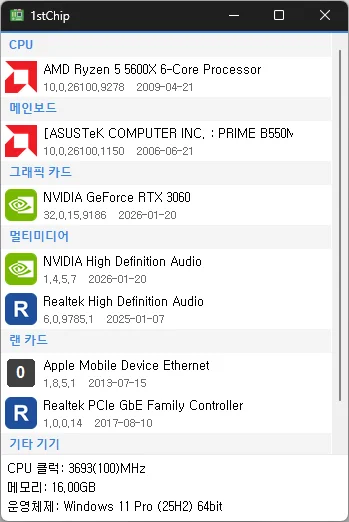
Wait just a few seconds after launching it, and it lists your CPU, motherboard, graphics card, sound card, and network card.
Each device displays its manufacturer’s logo, along with the version and date of the installed driver right below its name.
At the bottom, you’ll also find the CPU clock speed, memory capacity, and Windows version, so there’s no need to look them up separately.
Find missing drivers
You’ve probably seen something listed as “Unknown device” in Device Manager, right?
1stChip lists devices without drivers along with their manufacturers, and marks them with a yellow !.
So after reinstalling Windows, you can see at a glance which drivers are missing.
Don’t worry if you can’t get online because the network card driver is missing. Check the network card model, then download its driver using another PC.
Check for the latest drivers
If a newer driver is available, it will be marked with a !.
Hover over it to see the available version, or click it to open the device’s driver page.
When it’s useful
- When listing your PC specifications in a secondhand sales post
- When comparing your PC against a game’s recommended requirements
- When checking several PCs in rotation
It requires neither installation nor administrator privileges, so it’s handy to carry around on a USB drive.
Website
- 1stChip : https://kilho.net/1stchip
Download

History
-
Version 0.9.1 (2026/09/24)
- Fixed untranslated CPU clock, memory, and operating system information
- Fixed an issue where invalid date information could close the app
- Improved stability when loading PC information on some systems
- Fixed missing guidance for devices experiencing problems
-
Version 0.9.0 (2026/09/18)
- First Release
License
- 1stChip is freeware.
- You may use it freely at work, at home, in government offices, at school, or anywhere else.
- You may distribute it freely anywhere.
Frequently Asked Questions (FAQ)
- Does it install drivers automatically?
No. It tells you whether newer drivers are available and directs you to the download page.
You install them yourself using the manufacturer’s files. - Can I use it without an internet connection?
Yes. You can check your specifications and installed drivers offline. An internet connection is only needed to check for newer drivers. - Does it show ads?
No. There are no ads. - Can I use it without installing it?
Yes. It’s provided as a portable app; just extract the files and run it. - Is it paid?
No. It’s free (freeware).
Related links
- Update notices : https://blog.kilho.net/archives/notice/2940