
Update
- Fixed unexpected exits while loading the startup list in some environments
- Fixed list rows appearing partially clipped while scrolling
- Added a restart after graphics errors in some environments
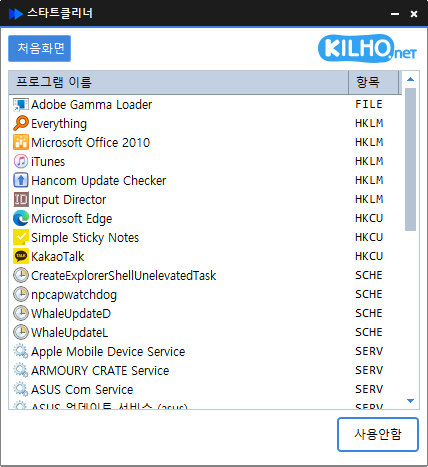
- Easily manage programs that run automatically at boot time.
- Unified management of startup folders, registry, task scheduler, services, and more.
- Safely change settings by disabling instead of deleting.
Website
- StartCleaner: https://startcleaner.kilho.net
History
-
Version 2.0.2 (2026/10/03)
- Reduced unexpected program exits on affected systems
-
Version 2.0.1 (2026/10/01)
- Improved performance and reliability with a new Rust port
- Improved managing startup programs and services quickly in one place
- Refined lists and workflows for easier access to key features
-
Version 1.1.2 (2026/09/22)
- Added a safety check to help prevent accidental deletion of startup items
- Fixed an error when loading update information on some devices
-
Version 1.1.1 (2026/07/20)
- Added complete removal of startup programs and their remaining traces in one step
- Enhanced confirmation and safeguards to help prevent accidental removal
- Improved an issue where removed programs could reappear in the list for some users
License
- StartCleaner is freeware.
- You can use it freely without restrictions on location, whether at a company, home, government office, or school.
- You may freely distribute it anywhere.
Download
 Download
(Windows)
Frequently Asked Questions (FAQ)
- Is StartCleaner free?
Yes, you can use StartCleaner for free at companies, homes, schools, government offices, and other locations. - Does it need to be installed?
No, you can run and use it right away without a separate installation process. - Can items only be disabled, not deleted?
Yes, you can safely manage settings by disabling items instead of deleting programs. - What items can it manage?
It manages all items that run automatically at startup, including Startup folders, registry entries, Task Scheduler tasks, and services.
Related Links
- Update announcement: https://blog.kilho.net/archives/notice/2940