
Update
- Added retries for up to one minute when the notification area icon fails to appear
- Added a loading indicator when search results take over 0.3 seconds to appear
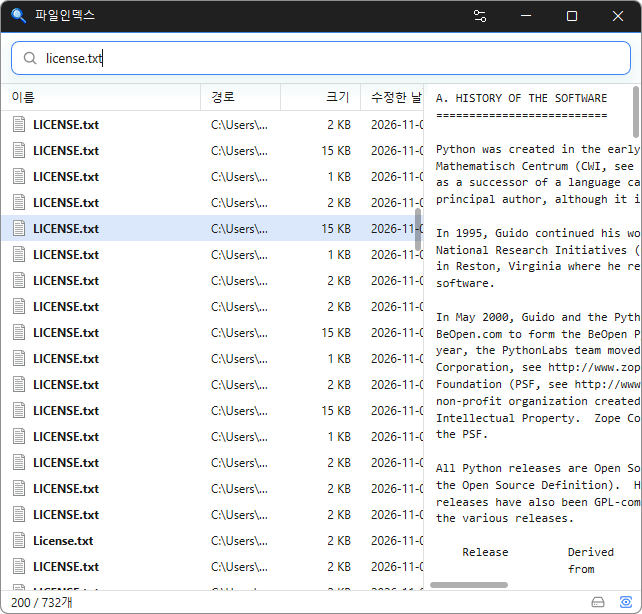
- Instantly find files across your entire PC by simply typing a file name.
- Supports Korean initial consonant search to find files with just a few keystrokes.
- Offers advanced search filters, including extensions, file sizes, wildcards, and regular expressions.
- Detects duplicate files by comparing names, sizes, and file contents.
- Keeps search results up to date by tracking file changes in real time.
- Minimizes system impact with fast initial indexing and low memory usage.
- Supports opening, copying, dragging and dropping, and previewing files just like File Explorer.
- Keeps your file index stored locally without sending data to external servers.
- Supports 22 languages and light and dark themes.
Homepage
- FileIndex: https://fileindex.kilho.net
History
-
Version 0.9.3 (2026/11/05)
- Added content search for text and document files with `:keyword`
- Added drag selection of multiple files from the path, size, or date columns or empty list space
- Changed startup indexing and change tracking to begin when the PC is idle
- Fixed the tray icon not appearing after startup in some environments
- Added the program version to the tray icon tooltip
-
Version 0.9.2 (2026/10/23)
- Fixed preview tasks that could stall or remain open on some systems
- Changed the right-click menu to the app menu and added a setting to use the Explorer menu
- Added direct file renaming in the results list
- Excluded Recycle Bin items from search results
- Added a global shortcut to open the window and F2 to rename files
- Added document previews for HWP, HWPX, DOC, DOCX, XLS, XLSX, PPT, and PPTX files
-
Version 0.9.1 (2026/10/22)
- Added a resizable preview pane beside search results
- Added document and text previews
- Added keyboard navigation for preview text
- Added drive capacity and free space details, with drive selection for searches
- Added Open Path and Copy Full Path to the right-click menu
- Kept other drives searchable while a new drive is indexed, with progress shown in the status bar
- Reduced full-drive reindexing when restarting the app or after changes accumulate
-
Version 0.9.0 (2026/10/17)
- First Release
License
- FileIndex is open-source software.
- You can use it freely anywhere, whether at home, at work, in government offices, or at school.
- You’re free to distribute it anywhere.
Download
 Download
(Windows)
(GitHub)
Frequently Asked Questions (FAQ)
- Is FileIndex free?
Yes, KPlayer is free to use at home, at work, in government offices, at school, and anywhere else. - Does it use a lot of memory if I leave it running?
No. When you close the window, it hides in the system tray and frees up the memory used for searching shortly afterward. While it’s out of sight, it runs using very little memory. - Does it include ads or adware?
No, FileIndex is completely free of ads and adware. No unwanted programs are installed along with it. - Are my file lists sent anywhere?
No, your file lists are stored only on your PC.
Related Links
- Update announcement: https://blog.kilho.net/archives/notice/2940