
Update
- Changed installation and removal to close the running app after saving
- Refined the appearance and highlighting of expanded selection lists
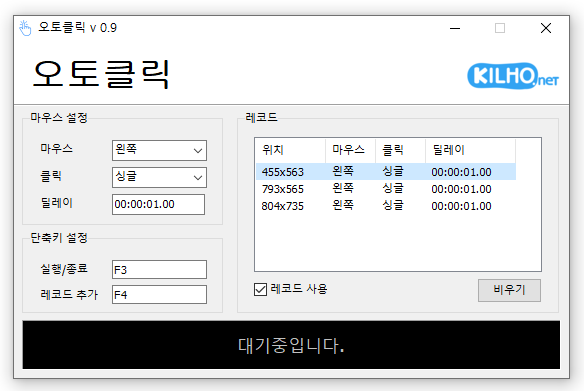
- A mouse automatic click program.
- You can add time and coordinates to use in multiple patterns.
- Click details can be specified.
홈페이지
- 오토클릭 : https://autoclick.kilho.net
History
-
Version 2.0.1 (2026/10/03)
- Fixed crashes after list saving failed during automatic clicking on affected systems
-
Version 2.0.0 (2026/10/02)
- Refactored the code for cross-platform support
- Added start / stop / completion notifications, stop shortcut guidance, and notification settings
- Improved relaunch behavior to bring the existing window to the front
- Prevented duplicate shortcuts with clearer messages
- Fixed auto-filled maximum intervals persisting after interval changes
- Improved readability of record intervals, running status, and dialogs
- Fixed menu mistranslations in some languages
-
Version 1.5.5 (2026/09/16)
- Fixed shorter wait times affecting some older saved records
- Fixed custom click interval ranges being reset when changing settings
- Added a notification when another program is using the same hotkey
- Improved responsiveness by reducing unnecessary delays after double clicks
- Prevented continuous clicking caused by an invalid repeat count
-
Version 1.5.4 (2026/08/13)
- Improved click accuracy with certain recorded coordinates
- Prevented unexpected behavior caused by invalid record data
- Changed record files to the `.lst` format for easier file management
- Improved record list display on high-resolution and scaled displays
라이센스
- 오토클릭은 Freeware 입니다.
- 회사, 집, 관공서, 학교 등 공간 제약 없이 마음대로 사용하실 수 있습니다.
- 자유롭게 어디에나 배포가 가능합니다.
Download
 Download
(Windows)
 Download
(macOS)
자주 묻는 질문(FAQ)
- 마우스 자동 클릭 프로그램은 무료인가요?
네, 이 프로그램은 회사, 집, 학교, 관공서 등 모든 환경에서 무료로 사용할 수 있습니다. - 프로그램 설치가 필요한가요?
아니요, 설치 없이 바로 사용할 수 있는 형태로 제공됩니다. - 여러 위치를 순차적으로 클릭할 수 있나요?
네, 여러 좌표를 설정하여 순차적으로 클릭하는 기능을 제공합니다. - 특정 시간 간격으로 클릭할 수 있나요?
네, 클릭할 시간 간격을 세부적으로 지정하여 사용할 수 있습니다.