
There is a new post. Click here to view the latest post.
Update
- Improved UI behavior when selecting save format
- Enhanced memory stability after drag capture
- Improved stability when receiving external commands
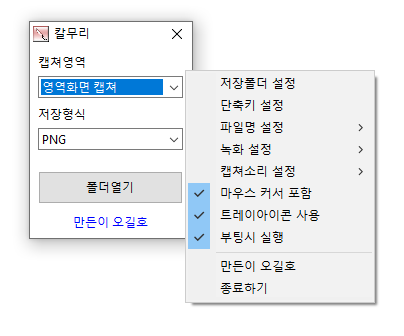
- Video recording support (designation of whole screen and area)
- Whole screen, active program, window control, area application
- Support for PNG, JPG, BMP, GIF, MP4 file formats
- Support saving text with OCR functionality.
- Support floating image feature.
- Share the captured image on the web.
- Color extraction function
- Full web page capture
- Printer output
Website
- Kalmuri: https://kalmuri.kilho.net
History
-
Version 4.1.8 (2026/01/22)
- Improved stability during capture and OCR processing
- Improved state handling for recording and capture operations
-
Version 4.1.7 (2026/01/02)
- Improved capture stability to reduce potential errors during long-term use
- Optimized repeated capture process to reduce unnecessary resource usage
- Improved tray icon behavior related to application startup
-
Version 4.1.6 (2025/12/12)
- Added option to automatically copy images to the clipboard when saving
- Improved usability by separating mouse inclusion for capture and recording
- Improved popup menu layout for better usability
-
Version 4.1.5 (2025/11/20)
- Improved folder selection behavior for older Windows versions
- Fixed issue where WebP quality setting was not saved
License
- Kalmuri is freeware.
- You can use it freely anywhere, including at work, at home, in government offices, and at school.
- You may distribute it freely anywhere.
Download
 Download
(Windows)
 Download
(macOS)
Frequently Asked Questions (FAQ)
- Is Kalmuri free?
Yes, Kalmuri is free to use anywhere, including at work, at home, at school, and in government offices. - Which formats are supported for saving captured images?
PNG, JPG, WebP, BMP, and GIF formats are supported. - Can I record videos, too?
Yes, you can record the entire screen or a selected area as a video. - Can I extract text from captured images?
Yes, you can extract text from images using optical character recognition (OCR). - Do I need to install the program?
No, Kalmuri is a standalone file that you can use right away without installation.
Related Links
- Update information: https://blog.kilho.net/archives/notice/2940